The right hitting screen is essential for a reliable golf simulator setup. It protects your space, reduces noise, and ensures clear projection for accurate practice. Below are five leading options that balance durability, ease of setup, and compatibility with common hitting nets and projectors. Each product is selected to help you build a more realistic practice environment at home, in a garage, or a dedicated studio.
Summary of chosen products:
| Product | Size / Type | Key Benefit |
|---|---|---|
| GoSports Golf Simulator Impact Screen | 108 x 82.5 inches (6.5 ft x 7 ft) or 9 ft x 7 ft | Durable polyester; compatible with real golf balls; versatile mounting |
| aikeec Golf Simulator Impact Screen | Various 5 sizes; 10 ft option common | 5 mm thick, reinforced edge; strong, quiet impact |
| MangoStar Golf Net + High-Density Screen | 11 ft x 8 ft cage with impact screen | Large practice area; sturdy frame; clear projection |
| Golf Simulator Impact Screen, Premium Triple Layer | Triple-layer design; enclosure compatible | Ultra-damping middle layer; durable for high volume |
| GoSports Golf Simulator Enclosure Nets | 10 x 8 ft, 12 x 9 ft, or 14 x 8 ft | Complete enclosure with frame and HD screen kit |
GoSports Golf Simulator Impact Screen
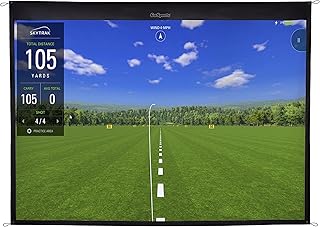
The GoSports impact screen offers two size options designed to fit a common GoSports hitting setup: 6.5 ft by 7 ft and 9 ft by 7 ft. Constructed from high-density woven polyester, it provides a robust backdrop for projector-based golf simulations. The design supports real golf balls and offers universal mounting through four corner grommets, or seamless connection to the GoSports ELITE Golf Net for a complete simulator ecosystem. This screen aims to balance durability with ease of use for home setups.
Durability and mounting versatility are central to this option. The material resists wear from repeated ball impacts, making it suitable for frequent practice sessions. The ability to hang or connect to a net gives you flexibility as your simulator layout evolves. If you already own a GoSports net system, integration is straightforward, minimizing setup time and maximizing practice time.
Consider this screen if you want a straightforward, sturdy solution that works well with mid-size simulators. While it is compatible with real golf balls, users should ensure sufficient projector brightness and room spacing to maintain image clarity across the chosen screen size.
aikeec Golf Simulator Impact Screen

The aikeec impact screen emphasizes durability and quiet operation. It uses a 5 mm thick polyester composition and a reinforced 7 mm edge, designed to withstand high-speed impacts as balls travel up to 110–200 mph. This construction reduces vibration and noise, contributing to a more peaceful home practice environment. The screen is designed for easy installation, with 32 to 46 grommets around the perimeter to accommodate various mounting methods, including cords, ropes, or carabiners. A flexible approach lets you tailor the setup to soft or hard ball impacts as needed.
Performance notes include long-term stability and reduced noise during impact, which is valuable for shared spaces. The screen’s sturdy build supports frequent swings without sagging, helping maintain image integrity for projection-based training. For home garages or entertainment rooms where noise matters, this option provides a balanced combination of resilience and quiet operation.
If you anticipate high-volume practice or want a setup that tolerates different mounting styles, the aikeec option is worth considering. It is especially suitable for users who regularly adjust their rig or need a robust perimeter with adjustable grommet placement.
MangoStar Golf Net With High-Density Screen

The MangoStar setup combines a large 11×8 ft hitting cage with an integrated high-density impact screen and a durable target cloth. This arrangement provides a wide practice area ideal for full swings, chipping, and driving. The frame uses powder-coated steel and fiberglass supports, delivering sturdy stability for long-term use in indoor or outdoor settings. The system is designed for straightforward assembly and disassembly, making it practical for temporary setups or spaces that require frequent reconfiguration.
The dense screen material is designed to resist tearing under high-speed ball impacts while maintaining image clarity for projection. Note that the screen is typically a blank surface that must be paired with a projector for visuals. The combination of a large practice area and robust construction makes MangoStar a strong choice for those seeking expansive space without compromising durability.
For users prioritizing a large footprint and easy portability, MangoStar offers a compelling option. It suits garages or basements where a roomy practice zone is desired and projection quality remains a key factor for immersive training sessions.
Golf Simulator Impact Screen, Premium Triple Layer
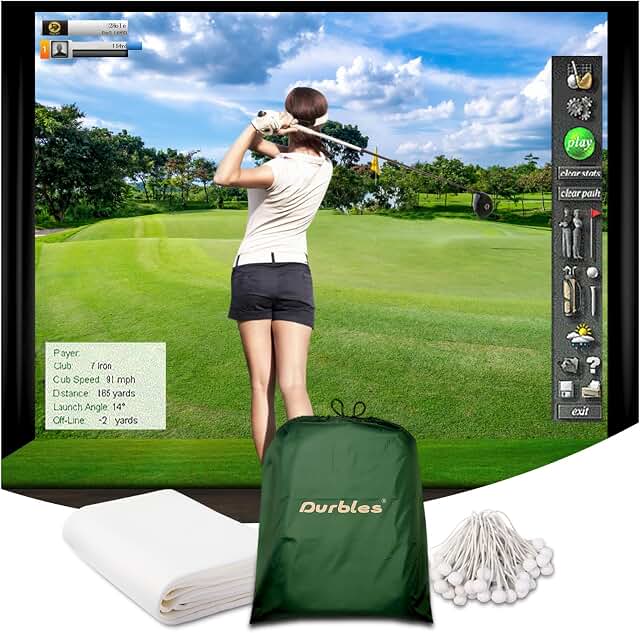
This premium triple-layer design centers on durability and sound management. The outer HD layer provides high visual quality for projections, while a middle ultra-sound damping layer reduces vibration and noise, and the inner layer delivers impact resistance. The combination aims to deliver improved longevity under repeated ball strikes, whether used in a home practice area or a commercial setting. This screen is intended for high-traffic use where reliability is critical.
From a performance standpoint, the triple-layer construction offers advantages in minimizing reflections and maintaining visual fidelity during intense practice sessions. The screen’s rugged build supports thousands of ball impacts, making it a robust option for serious golfers who use simulators frequently. The design also emphasizes stability to prevent sagging or motion during powerful swings.
Choosing this option is sensible for those who need a screen that can endure heavy usage while preserving a quieter practice environment thanks to its sound-damping properties. It is suitable for dedicated home studios or small commercial spaces where consistency matters.
GoSports Golf Simulator Enclosure Nets

The GoSports enclosure nets provide a complete solution with multiple size options: 10 x 8 ft, 12 x 9 ft, or 14 x 8 ft. This package includes the frame and an HD impact screen kit, forming a professional indoor golf studio experience. The frame is steel-based for durability, and padded interior edges minimize ball rebound. This enclosure is designed to work with various launch monitors and projectors, offering broad compatibility for different setups.
With its emphasis on a stable, enclosed space, this option reduces risk to surroundings while allowing comfortable practice at higher swing speeds. The modular frame supports different room layouts, and the included HD screen kit helps ensure clear visuals. Space considerations are essential; verify room dimensions to ensure the enclosure fits while leaving space for practice swings and projector projection.
The enclosure is a strong choice for users who want a turnkey setup that limits ball travel and provides a dedicated practice environment. It is particularly useful for garages or standalone practice rooms where containment and setup speed matter.
Buying Guide: Key Considerations For Selecting a Golf Simulator Hitting Screen
- Screen material and thickness: Higher thickness often means better durability and less sag, but check for image clarity and projection compatibility.
- Size and room fit: Measure your space carefully. Smaller rooms benefit from smaller screens, while larger cages require bigger screens to avoid distortion and crowding.
- Perimeter grommets and mounting: Decide between corner mounting, ceiling hooks, or connections to a net. Ensure grommet placement aligns with your setup.
- Noise and vibration control: Look for screens with dampening layers or reinforced edges to reduce noise during impact, especially in shared spaces.
- Framing and enclosure: If you need containment, consider complete enclosure systems with a frame and HD screen; ensure compatibility with your projector and launch monitor.
- Durability and ball speed handling: If you practice with higher speeds, opt for thicker, reinforced edge screens designed to withstand strong ball impacts.
- Ease of assembly: Quick setup and straightforward disassembly are valuable for spaces that are reused or reconfigured frequently.
- Projection clarity: For projection-based sims, ensure the screen material supports crisp image quality and minimal glare, with a surface designed for projection.
- Compatibility with equipment: Verify that the screen works with your projector, ball-tracking monitor, and frame system to avoid fitment issues.
- Maintenance: Choose screens that are easy to clean and resistant to creasing or tearing, particularly for long-term use.