Finding the right projector for a golf simulator involves balancing brightness, throw distance, color accuracy, and low input lag to deliver lifelike swings and ball flights. The models below are among the best options for creating a realistic home or classroom golf setup, with features tailored to golf simulation workflows, such as high brightness, wide color gamut, and fast response times. Each entry includes a quick overview, key specs, and how it fits a golf simulator environment. Use this guide to compare performance, install needs, and connectivity for a seamless indoor golf experience.
| Product | Brand | Key Strengths For Golf | Throw & Brightness |
|---|---|---|---|
| BenQ TH671ST | BenQ | Low input lag, full HD, gaming mode, short throw | Short throw, 3000 ANSI lumens |
| ViewSonic LS740W | ViewSonic | High brightness, golf mode, flexible projection | 5000 ANSI lumens, long throw options |
| ViewSonic PS502X | ViewSonic | Bright, short throw, education/office oriented | 4000 ANSI lumens |
| BenQ TK700ST | BenQ | 4K HDR ready, short throw, gaming latency | Short throw, 3000 lumens |
| BenQ TH575 | BenQ | Low latency gaming mode, good contrast | 3800 ANSI lumens |
Note: The selections emphasize brightness for clear daytime golfing indoors, short or flexible throw to fit compact setups, and low latency to maintain realistic ball response. Each model is compatible with standard HDMI inputs and supports multiple streaming or game devices to help you run golf simulators smoothly in small spaces.
BenQ TH671ST 1080p Short Throw Gaming Projector

The BenQ TH671ST is designed for fast, responsive action with gaming-focused features. It delivers native 1080p resolution with 3000 lumens and a high native contrast ratio for vivid images. A short-throw capability lets you create a 100-inch image from about five feet, which is ideal for compact golf simulators. The projector’s low input lag ensures minimal delay during driver swings and practice shots, helping to maintain timing accuracy. It also supports universal connectivity to pair with gaming consoles, streaming devices, and media players.
Key features supporting golf simulation:
– Native Full HD 1080p resolution with accurate color performance
– Ultra-fast input lag and a refresh rate that aligns with popular consoles
– Short throw to project large images from a small footprint
– Built-in speaker for simple audio setups without external gear
WiMiUS P62 Pro Smart Outdoor Projector

The WiMiUS P62 Pro offers a robust smart experience with built-in apps and easy streaming. It supports Prime Video and YouTube through its app store and provides dual HDMI inputs for flexible connections. Its 4K compatibility and OTA updates help maintain current streaming apps, which can be useful for golf simulator software that runs on streaming platforms. The P62 Pro emphasizes ease of use and reliable wireless connectivity, making it a practical option if you want a self-contained system ready for interactive practice sessions.
Key features for golf simulations:
– Smart OS with built-in apps for quick access to course content
– Dual HDMI inputs and USB ports for multiple devices
– Wi‑Fi 6 for stable wireless streams and casting
– Auto focus with user-friendly setup
HAPPRUN Native 1080P Bluetooth Mini Projector

The HAPPRUN H1 offers a compact, portable option with native 1080p resolution and built-in Bluetooth speakers, making it convenient for a small golf simulator setup without extra sound equipment. Its compact size suits mobile practice areas or garages where space is at a premium. Bluetooth connectivity allows pairing with external speakers for enhanced audio, while the projector’s supported inputs enable easy connections to gaming consoles and streaming devices.
What makes it golf-friendly:
– Native 1080p for clear image detail
– Built-in speakers with Bluetooth flexibility
– Small footprint for tight spaces
– Compatible input options for consoles and streaming devices
ViewSonic PS502X 4000 Lumens XGA Short Throw

The ViewSonic PS502X is a short-throw projector that excels in bright environments, a common scenario for golfer practice spaces where windows or lights can be present. While it uses XGA resolution, its 4000 ANSI lumens provide strong image brightness and clarity for viewing course textures, fairways, and greens on a large screen. Its variability in screen size—from 30″ up to 300″—lets you tailor the setup to your room.
Golf-simulation benefits:
– High brightness for vivid course visuals
– Short throw to fit smaller rooms
– Wide screen size range for flexible layouts
– Solid color reproduction for realistic greens and sand visuals
BenQ TK700ST 4K HDR Gaming Projector

The BenQ TK700ST brings 4K HDR capabilities to a compact, short-throw form factor ideal for golf simulators. It’s designed for gaming with low latency, ensuring responsive control during swing analysis and club tracking. The short throw lets you place the projector close to the screen while still achieving large image sizes, reducing shadows and interference during practice sessions. HDR support enhances color depth for more realistic course views.
Relevant golf features:
– Short throw with 4K HDR readiness
– Low latency suitable for swing-based software
– Bright output for clear play in well-lit rooms
– Flexible connections for consoles and media players
BenQ TH575 1080p Indoor Gaming Projector
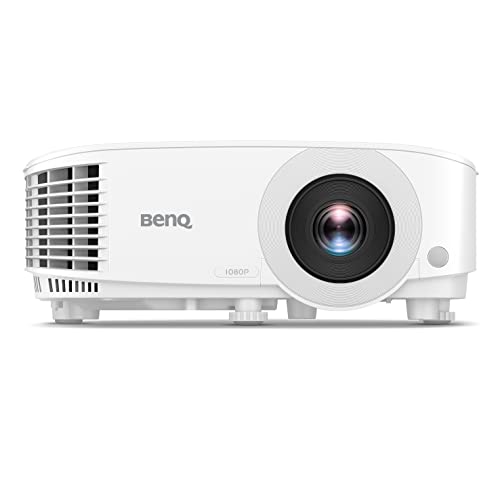
The BenQ TH575 targets gaming with a strong 1080p image and 3800 ANSI lumens. Its low latency (around 16ms) supports quick response times for golf simulator software, providing smooth image motion during rapid club movements. The TH575 also includes standardized connectivity and a useful zoom feature to fit different room sizes, making it a versatile option for multi-purpose entertainment spaces that double as golf studios.
Buying Guide: Key Purchase Considerations For Golf Simulators
When selecting a projector for golf simulation, consider the following aspects to optimize realism and practicality:
- Brightness: Look for 3000 ANSI lumens or higher to maintain image clarity in rooms with ambient light.
- Throw Distance: Short-throw or ultra-short-throw models help you fit a large screen in smaller rooms and reduce shadowing from your stance.
- Resolution and Image Quality: For precise swing analysis, 1080p is often sufficient, but 4K HDR can improve texture detail on fairways and greens.
- Input Lag: A low latency (< 16 ms ideally) is important for real-time swing feedback and practice accuracy.
- Color Accuracy: A wide color gamut and good color tracking enhance green hues and course visuals, improving realism.
- Connectivity: Ensure multiple HDMI inputs and support for streaming devices or game consoles; wireless options can simplify setup.
- Mounting and Space: Consider ceiling or wall mounting compatibility and room dimensions to maximize image size without distortion.
- Maintenance: Lamp life, replacement costs, and potential for fan noise should influence your choice for a dedicated golf room.
For golf simulators, balancing brightness with affordable optics and a comfortable throw distance is typically the most impactful combination. Short-throw models help keep the hitting area clear of projector obstructions and reduce shadows. If you plan to use streaming software or on-screen course libraries, models with built-in smart features or easy app access can simplify daily use. Finally, assess the installation space, screen size, and budget to determine which projector aligns best with your indoor golfing goals.